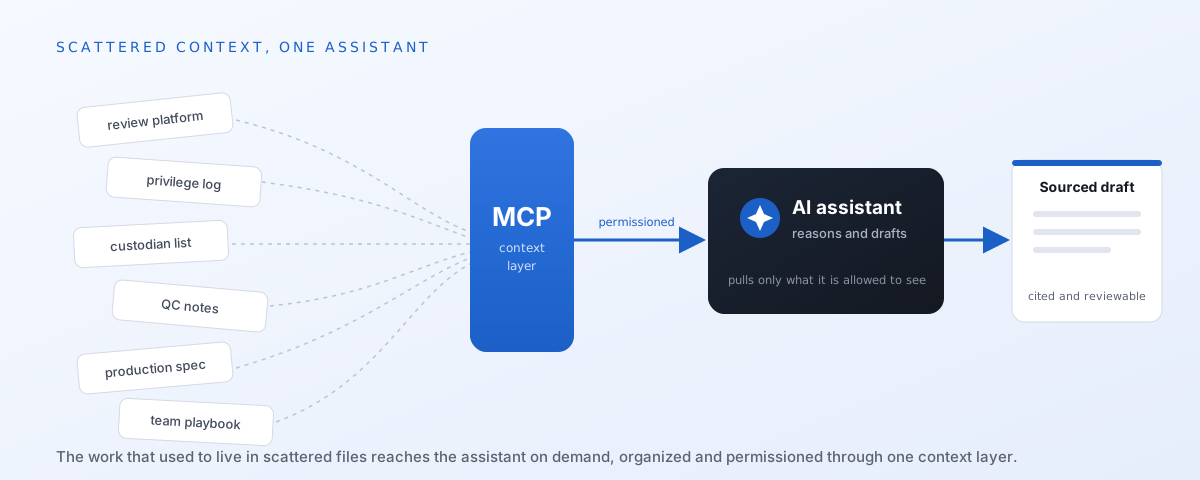
Model access used to be the differentiator. It isn't anymore. Your model is only as useful as the context it can access. The real preparation is not just picking a powerful model assistant but also allowing that model access to the working files that makes the assistant useful: clean reports, documented workflows, current playbooks, clear permissions, and systems organized so a model can reach the right material safely.
Every legal team can reach a capable model, so the competitive edge has moved to context. The Legal Nodes benchmark put numbers on it: the same model produced substantially better results once it was paired with legal plugins. The model didn't change. The configuration, harness, and context around it did.
Most eDiscovery work does not live in one clean place. A single matter can span a review platform, exported reports, search term hit counts, privilege logs, production specs, QC notes, custodian trackers, project folders, email updates, TAR reports, and internal playbooks. The team usually knows which spreadsheet is current, which report has been replaced, and which workflow actually gets used. That knowledge is real, but it is scattered across people, folders, systems, and habits. An AI assistant starts with none of it.
That context gap is the immediate roadblock. Powerful models are useful only when they can reach the right information at the right time, under the right permissions. The organizations that solve that gap will be in the best position to use the next generation of legal AI tools.
What MCP actually is
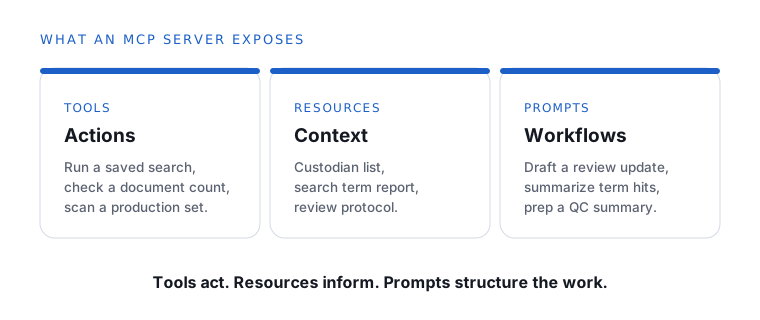
Model Context Protocol is a standard way to expose systems, data, and workflows to an AI assistant through a controlled interface. An MCP server acts as the connective layer between the assistant and the tools a legal team already uses. In plain terms, MCP turns review platforms, project folders, databases, and workflow playbooks into an interface an AI assistant can use.
The important distinction is that the MCP server is not the AI brain. The model still does the reasoning, drafting, and summarizing. The server decides what the model is allowed to touch. It controls the actions the model can request, the information it can read, the workflows it can use, and the permissions that apply to all of it.
How an MCP connection works
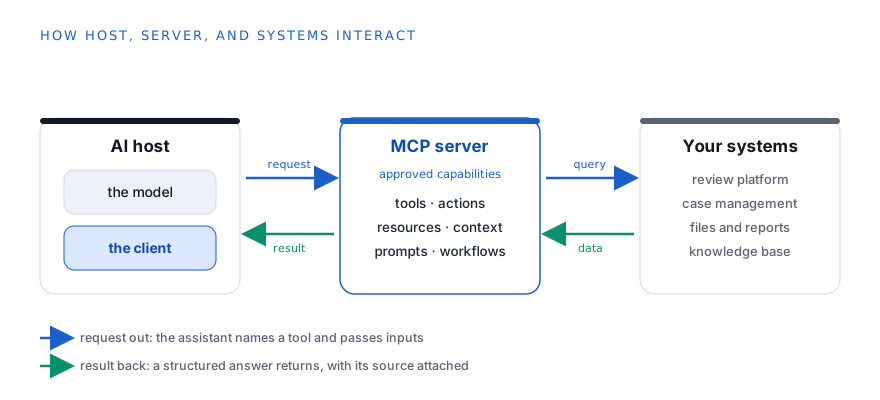
There are three main pieces in an MCP setup: the host, the client, and the server.
The host is the AI application. It might be a desktop assistant, chat application, coding tool, legal platform, or internal review interface. This is where the user interacts with the assistant.
The client is the protocol connector inside the host. It manages the connection to one MCP server, asks that server what it offers, sends approved requests, and receives results. The client is not the model. It is the controlled communication layer between the host and the server.
The server is a separate program that exposes approved capabilities. The model does not reach directly into your systems. Every request travels through the host, through the client, to the server, and back. That separation is what makes access easier to audit, limit, and govern.
What local actually means
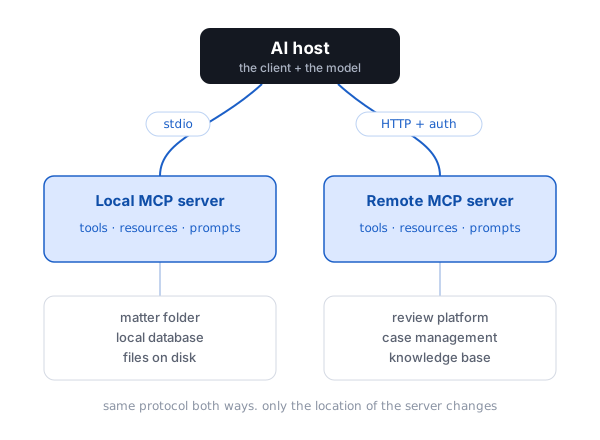
A local MCP server is not just a vague thing sitting on your computer. It is a running process. It might be written in Node, Python, Go, or another language. The host application starts it the same way a terminal starts a program: by running a command with a defined set of arguments, environment variables, and permissions.
For example, a host configuration might tell the assistant application to start a local server by running a script, point that server at a specific matter folder, and give it a short list of approved capabilities. The server starts as a child process of the host or as a local background process under the user's operating system account. That matters because the server can only reach what that process is allowed to reach.
The model does not get free access to the hard drive. The host opens a communication channel to the local server. The local server exposes named tools, resources, and prompts. The assistant can request those named capabilities. The server decides what to do with the request and returns a structured result.
Many local MCP servers communicate through standard input and standard output. That is the same basic pipe a terminal uses to pass text into a program and receive text back. The host writes structured protocol messages into the local server process. The server writes structured protocol messages back. No public web address is created. No outside service needs to reach into the machine.
That detail is important. A local server can read a permitted folder or call an internal command-line tool because the operating system allows that local process to do so. At the same time, the assistant only sees the controlled menu the server exposed. The model sees the answer returned by the tool, not the entire machine.
Take a review workstation. A local MCP server could be configured with read-only access to one matter folder. It might expose tools called
get_review_counts, read_qc_notes, get_production_manifest, and compare_privilege_log_fields. A user asks for a production QC summary. The assistant calls the approved tool. The local server reads the permitted folder, pulls the approved fields, returns the result, and logs the call.That is very different from letting an assistant rummage through a workstation. The local server gives the assistant a narrow doorway. The doorway can be limited to one folder, one database, one command, one matter, or one workflow. The legal team decides what the doorway exposes.
This is why local servers matter for sensitive work. The data can stay on the workstation, inside a virtual desktop, or inside the firm's internal network. The assistant still gets useful context, but the path to that context is controlled by the local process, the operating system permissions, the server configuration, and the audit log.
What remote means
A remote MCP server works differently. It runs as a hosted service reached over HTTP, usually through HTTPS and authentication. The host connects to an endpoint. The server checks the user's identity, applies matter-level permissions, and returns data or runs approved tools.
This is the natural fit for shared platforms. A review platform, case management system, or knowledge base can expose one remote MCP server for the team. Each user reaches the same service, but the server still applies that user's permissions.
The tradeoff is control versus scale. A local server keeps the path short and can keep sensitive data off the public internet, but it has to be installed and maintained on the machine or inside the controlled environment. A remote server is easier to share across a team and easier for a vendor to maintain, but requests travel across a network and depend on authentication, hosting controls, platform permissions, and vendor security.
Both versions speak the same protocol. In either setup, the server advertises exactly what it offers: which tools can be called, which resources can be read, and which prompts can be selected. The client receives that menu of approved capabilities. Nothing outside that menu is available to the assistant.
The interaction loop
The loop is simple.
That is the difference between pasting ten exports into a chat window and giving the assistant a disciplined way to fetch live review counts, the current custodian list, and the controlling production spec. For eDiscovery work, context is not a side issue. Context is the work.
The value is structure. The assistant does not need to ingest the entire matter. It also does not need to guess where the answer might be. It gets the specific slice of information needed for the task, in a form that carries its own source.
What this looks like on a matter
Take a routine request: prepare this week's review status update.
Without structured access, someone opens the review platform, pulls counts, exports a report, looks through shared folders, finds the QC spreadsheet, checks open issues, cross-references deadlines, and pastes figures into an email. The same work repeats every week.
With an MCP server connected, the user selects a weekly review update workflow and names the matter and audience. The server provides the approved status data, key metrics, open QC issues, and upcoming deadlines. The assistant drafts the update in plain English. The reviewer edits it and decides whether it goes out.
The assistant did not invent the numbers. It should not. It used controlled access and a structured workflow to reach the right sources and communicate the result clearly.
The same pattern applies to comparing search term reports, flagging zero-hit or overbroad terms, checking a production set for missing metadata, and surfacing the team's playbook when a new hire asks how QC runs on a particular matter.
Different inputs, same pattern: the human picks the workflow, the server supplies the context, the assistant drafts, and the human stays accountable for the result.
Governance cannot come later
MCP is not a replacement for legal judgment. It is not secure by default just because it follows a standard. It does not guarantee a correct answer.
MCP makes assistants more capable, so governance has to be part of the design from the start.
A defensible setup should rely on matter-level permissions, read-only defaults, audit logs, and a clear line between drafting and publishing. Drafting a status update is low risk. Sending it to a client, writing back to a system of record, or changing matter data should require explicit human approval.
The point is not to let AI run discovery unsupervised. The point is to make approved workflows faster and more consistent while a person stays responsible for what goes out the door.
What MCP is not
The output is only as good as the underlying data, the tool design, the workflow structure, and the human review behind it. MCP does not hand AI control of a matter. It gives AI permissioned access to the context the team already relies on.
That distinction matters. MCP is not magic. It is plumbing. Good plumbing matters because legal work breaks down quickly when the wrong material gets pulled into the wrong task.
Where eDiscovery is heading
The bottleneck in AI for eDiscovery was never a shortage of capable models. The bottleneck is getting the right context to them safely and efficiently. MCP is one of the first broadly adopted answers to that problem. It arrives as legal platforms, case management tools, knowledge bases, and internal systems are beginning to expose more structured endpoints of their own.
Picture the near term. The review platform, case management system, knowledge base, project folders, production specs, and team playbooks are organized so the assistant is not hunting through disconnected files. The assistant is no longer a feature bolted onto one tool. It becomes a controlled layer across the matter, with every call scoped to what the user is allowed to see.
That is a different posture than uploading a pile of documents to a chatbot, writing a vague prompt, and hoping for the best. It is auditable, permissioned, and repeatable. Those are the three things discovery has always demanded and most AI tooling has lacked. The teams that get early value will not be the ones with the flashiest assistant. They will be the teams whose context is already in order when the connection gets made.
A free remote MCP you can try
If you want to see the remote-server model in practice without touching any client data, you can connect a free, read-only MCP today. The eDiscovery Decoder MCP is built for exactly this kind of hands-on learning. It is offered as a free educational tool, and it exposes only eDiscovery news and educational TAR and review calculators, never matter data. That makes it a low-risk way to experience how a host connects to a remote MCP server, requests approved capabilities, and gets back structured results. Point your assistant at the endpoint below to try it:
It provides read-only eDiscovery news and educational TAR and review calculators. It is not legal advice and is not a substitute for legal judgment or independent professional review.
This MCP server is remote. The server is not running on the user's laptop. The assistant reaches a hosted endpoint, receives the approved capabilities from that endpoint, and can request only the read-only tools and resources the server exposes. For a legal team, the same pattern can apply to a review platform, case management system, or knowledge base, with authentication and matter-level permissions controlling access to client data.